

Introduction: The Hidden Complexities of Choosing the Right Camera
Choosing a security camera for your Network Video Recorder (NVR) seems straightforward, but the technical details that determine a system’s real-world effectiveness are often overlooked. A poor choice can lead to compatibility headaches, unusable footage, and a system that fails when you need it most. This article reveals five of the most impactful, yet commonly missed, considerations to ensure you build a security system that truly meets your needs.
Not sure which recorder to use? start with NVR vs DVR: NVR vs DVR
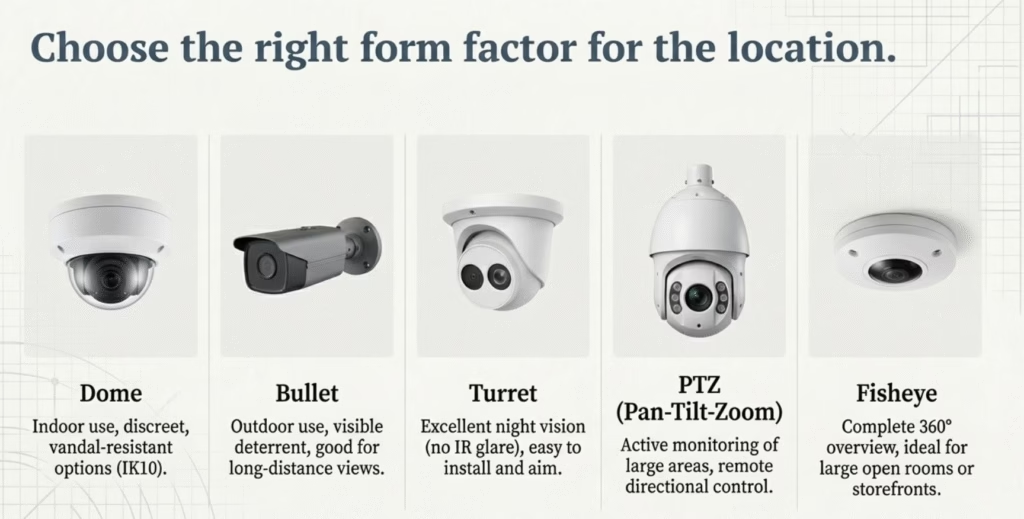
1. Your New Camera and Old Recorder Might Not Speak the Same Language
True compatibility is about more than just a plug that fits. While the ONVIF standard helps ensure that most IP cameras can send a basic video stream to an NVR, it is not a silver bullet for full functionality. For a seamless setup and access to all features, especially advanced ones, camera systems work best when the NVR and cameras are from the same brand. Pairing a Hikvision NVR with Hikvision cameras or a Dahua NVR with Dahua cameras prevents frustrating setup issues and guarantees that every feature works as intended.
2. Chasing 4K Resolution Can Cripple Your System
While a higher megapixel count sounds better on paper, it comes at a significant cost to your system’s resources, demanding more storage space and network bandwidth. Before you buy a 4K camera, consider the practical requirements:
- A 2MP (1080p) camera is often sufficient for small rooms.
- A 4MP camera provides a good balance of detail and efficiency for homes and offices.
- A 6MP–8MP (4K) camera is best for large areas like parking lots and consumes a massive 8–16 Mbps of bandwidth per camera.
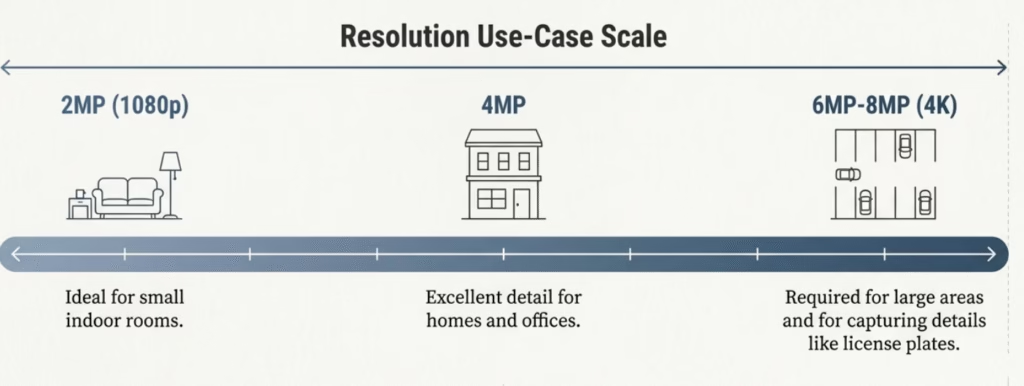
The most critical step is to check your NVR’s maximum incoming bandwidth (e.g., 80 Mbps). To put that in perspective, a common 80 Mbps NVR can only handle five 4K cameras operating at their peak 16 Mbps stream. Adding a sixth camera—or even just experiencing network traffic spikes—could cause dropped frames or system instability. While modern H.256 compression helps reduce the data load, the fundamental trade-off between resolution and resources remains.
3. The Lens You Choose Is as Important as Where You Point It
The camera’s lens determines your field of view, and choosing the wrong one can render your footage useless. A lens that’s too wide can lose critical detail on distant objects, while one that’s too narrow can miss important activity at the periphery. The advice is simple and actionable:
- Use a 2.8mm fixed lens for wide areas like yards or open-plan rooms.
- Use a 4mm fixed lens for narrow or restricted areas like hallways or entryways.
For locations where you need flexibility, a varifocal lens allows you to adjust the zoom and field of view. This becomes even more critical for specific objectives; for instance, reliable license plate capture often requires a higher resolution 4MP–8MP camera paired with a motorized varifocal lens to zoom in on the target area.
4. “Night Vision” Is More Than Just Black and White
Standard infrared (IR) night vision illuminates an area for the camera, but it produces a black-and-white image and can suffer from issues like “IR glare,” where light bounces off a close object and washes out the image. Look for cameras with Smart IR, a feature that automatically adjusts infrared intensity to prevent this overexposure.
When choosing a camera model, consider that Turret cameras often experience less IR glare than Dome models. While Dome cameras are often chosen for their discreet look and vandal-resistant properties (look for an IK10 rating for high-risk areas), their enclosed design can sometimes cause IR reflection. Furthermore, for any outdoor installation, ensure the camera has an IP66 or IP67 weatherproof rating to protect it against the elements.
More importantly, look beyond basic IR. Advanced low-light technologies like Starlight or ColorVu (Color Night Vision) use highly sensitive sensors to produce clear, full-color images in near-dark conditions. Finally, always check the camera’s specified IR range (e.g., 20m, 30m) to ensure it is powerful enough to illuminate the entire area you need to monitor.
5. Your “Smart” Camera Needs a Smart NVR to Match
Modern IP cameras are packed with powerful AI-driven analytics, such as human detection, vehicle detection, and line-crossing alerts. These smart features can transform a passive recording device into a proactive security tool. However, they are completely useless if your NVR doesn’t support the specific analytics being sent by the camera. Brands often have their own proprietary AI systems, like Hikvision AcuSense or Dahua WizSense. Before investing in a smart camera, you must verify that your NVR is compatible not just for video, but for the advanced AI features you are paying for.
Conclusion: Building a System, Not Just Buying a Camera
A single oversight—like an NVR with insufficient bandwidth—can invalidate thousands of dollars spent on premium 4K cameras. These five checks aren’t just about avoiding frustration; they’re about ensuring every component you invest in works in concert to create a security system that is resilient, reliable, and truly effective. Moving beyond the marketing hype and focusing on these critical system-level details is the key to building a solution that delivers real security value.
Full guide to IP camera types: Guide to IP Cameras
Now that you know what to look for, which single component of your security system are you going to re-evaluate first?



Leave a Reply